PDF reports and secure links
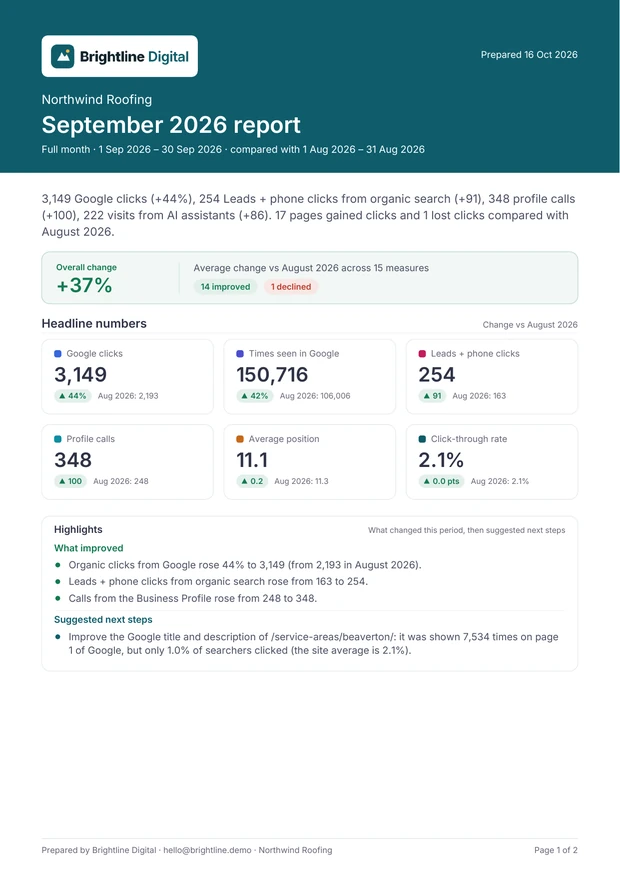
The emailed PDF
Choose Attach a two-page PDF of the report in the site’s email settings. It’s made on your server, with no browser or outside service:
- Page 1: headline numbers and highlights
- Page 2: the six-month trend, conversions and top pages
Keyword lists stay in the online report. Download PDF on the report screen makes the full, longer PDF in your browser.
Highlights
Short lines on what improved, what declined and suggested next steps, worked out from the report’s own numbers. They say what changed, not why. In review mode you can edit them before the report goes out.
Secure links
An optional link that opens that report’s PDF without logging in. It’s signed for one site and one report, and expires after the number of days you choose (1 to 90). Revoke every link sent so far for this site stops all of them. Turning secure links off and on again also invalidates links sent earlier.